Skip to content
The Mizu app icon: a light blue water drop over soft ripples on a dark tile

A menu bar app for macOS 26

The calm layer between your Mac and your AI tools.

See every dev server and every agent session. Fix what broke in one click. Clean what they leave behind, with an undo.
  • One-time purchase
  • 14-day money-back guarantee
  • macOS 26 or later
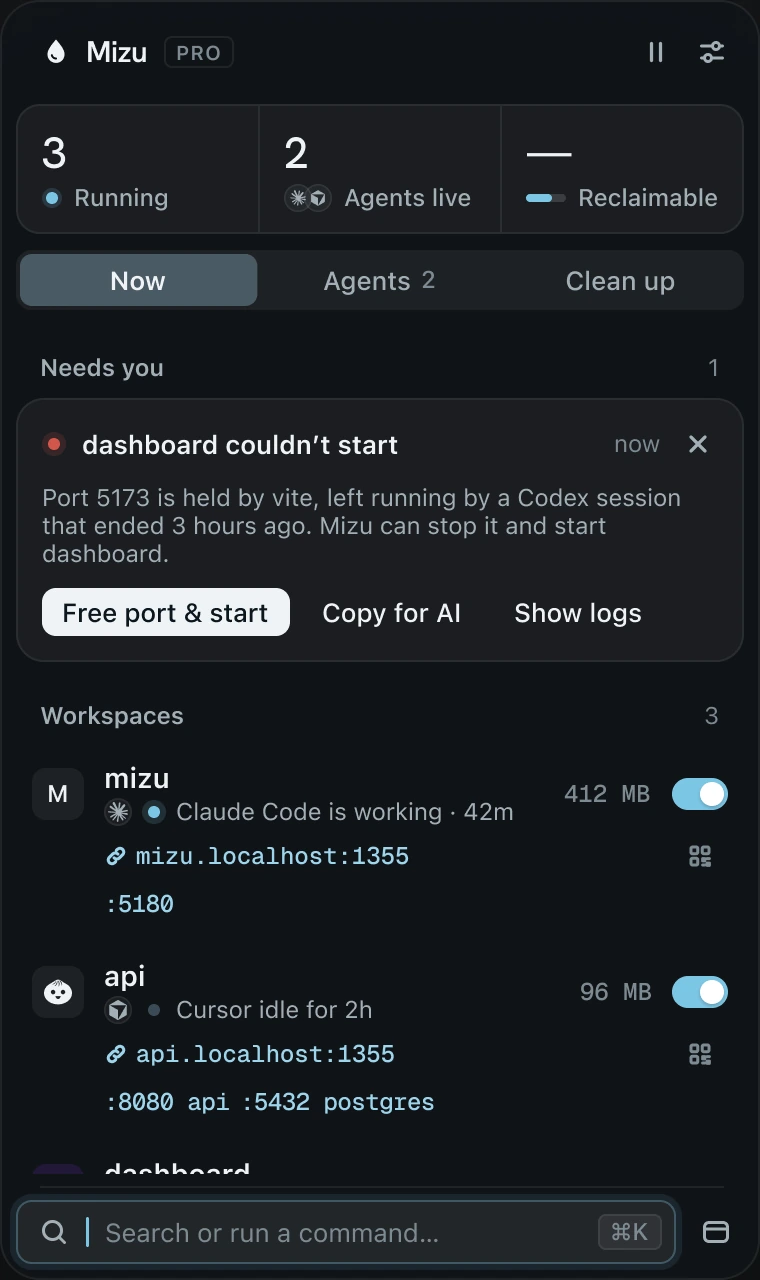
The Mizu panel: 3 running, 2 agents live. Needs you says dashboard couldn’t start because port 5173 is held by vite, left by an ended Codex session, with Free port & start. Below, the mizu and api workspaces with their local links.

01 — Workspaces

Every project, one switch.

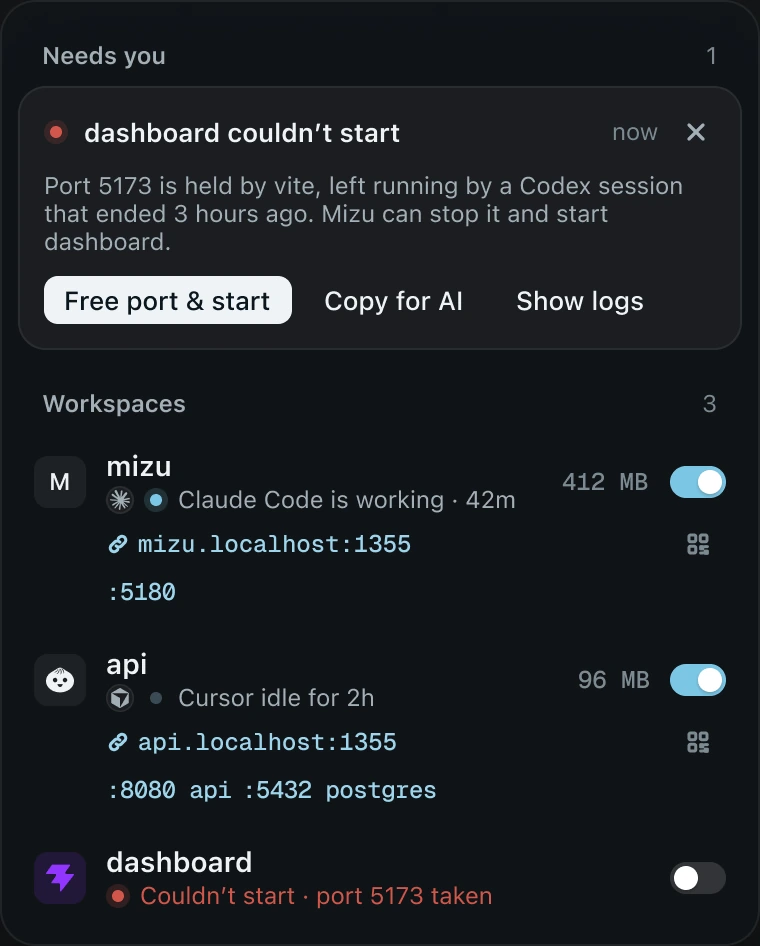
Mizu finds every dev server on your Mac and groups it by project. One switch starts or stops a workspace. When one stops on its own, Needs you says why and fixes it in one click.
Full scan
10 ms
Free port & start
1 click
Framework marks
60
Mizu’s Needs you card: dashboard couldn’t start, port 5173 is held by vite, with Free port & start, Copy for AI and Show logs. Under it the mizu, api and dashboard workspaces with their switches, memory and local links.

02 — Agents

Know what your agents left running.

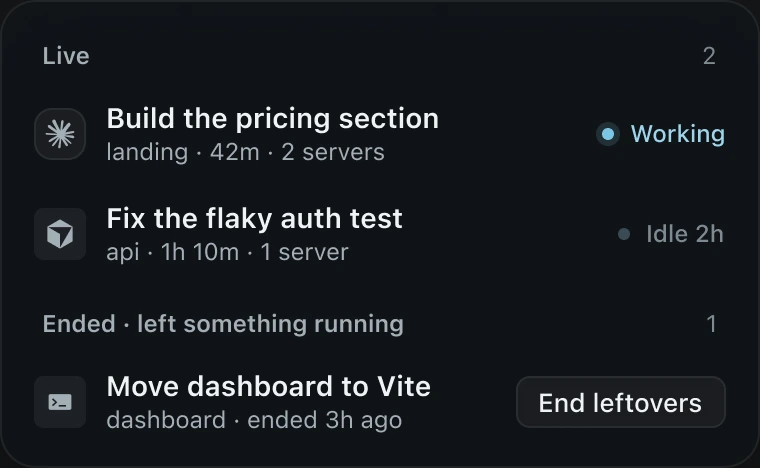
Claude Code, Codex and Cursor sessions show as Working, Idle or Ended. When a session ends and its server keeps going, End leftovers stops exactly those, never anything you started yourself.
  • Claude Code
  • Codex
  • Cursor
Mizu’s Agents list. Live: Build the pricing section, Working, and Fix the flaky auth test, Idle 2h. Ended, left something running: Move dashboard to Vite, with an End leftovers button.
  •   Reads session metadata only, never messages
  •   Knows which agent started which server
  •   A 24-hour chart of every session
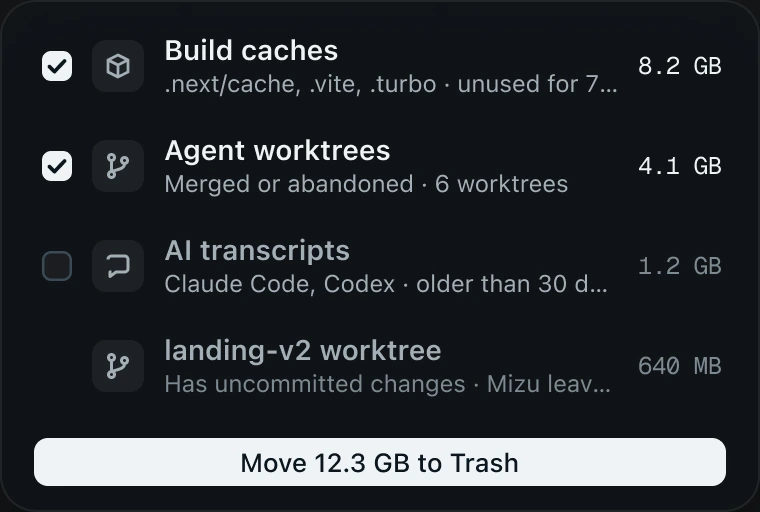
Mizu’s Clean up list: Build caches 8.2 GB and Agent worktrees 4.1 GB checked, AI transcripts 1.2 GB unchecked, and a landing-v2 worktree with uncommitted changes left alone. A button reads Move 12.3 GB to Trash.

03 — Clean up

12.3 GBback on your disk,
with an undo.

Old AI transcripts, merged worktrees and stale build caches, measured and moved to Mizu’s own Trash. Undo puts every item back at its exact path.

  •   Nothing is deleted for 7 days
  •   Leaves anything with uncommitted changes alone
  •   AI transcripts are never checked for you
⌥Space

05 — Command palette

Everything, from one shortcut.

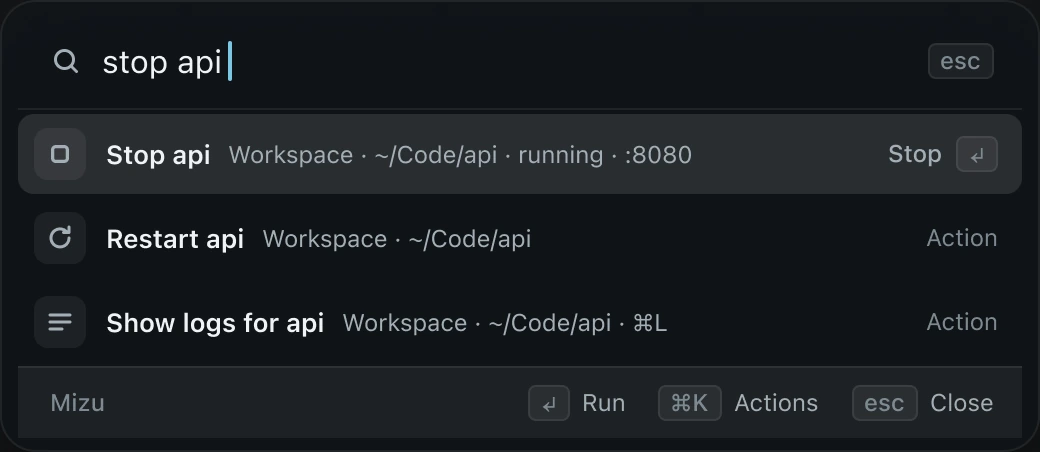
One search over workspaces, servers, agents and Clean up, on top of any app. Type “free 5173”, “stop api” or “open landing in cursor”, then ↵.
  •   Destructive commands never run by accident
  •   Every panel action, with the same guards
  •   Remembers your last 20 commands, nothing else
Mizu’s command palette with “stop api” typed. Results: Stop api, Restart api and Show logs for api, with Run, Actions and Close keys along the bottom.

Built to be trusted

Nothing leaves your Mac.

  • No telemetry.

    No analytics and no crash reporter. Mizu talks to its licence server only to activate and to check your key. That’s all.

  • Metadata, never messages.

    Agents are seen through titles, folders and process ids. Prompts, messages and environment values are never read.

  • Nothing deleted behind your back.

    Clean up moves things to Mizu’s own Trash first, with an undo for 7 days. Anything with uncommitted work stays where it is.

Pricing

One price. Yours to keep.

Every licence includes a year of updates. After that, Mizu keeps working, and renewing is half price.

1 Mac

$29

One-time purchase


  • Use Mizu on 1 Mac
  • Every update for one year
  • Renew updates for $15

2 Macs

$39

One-time purchase


  • Use Mizu on 2 Macs
  • Every update for one year
  • Renew updates for $20

3 Macs

Best value

$49

One-time purchase


  • Use Mizu on 3 Macs
  • Every update for one year
  • Renew updates for $25

14-day money-back guarantee  ·  Prices in USD, taxes at checkout

Questions

Good to know.

Why does macOS ask me to Open Anyway?
Mizu is sold directly, not through the App Store, so Apple hasn’t reviewed it. The first time you open it, macOS stops it once. Open System Settings › Privacy & Security and click Open Anyway. Updates never ask again.
What happens after the year of updates?
Mizu keeps working, for good, and you keep every version released in your year. Renew at half price whenever you want the newer ones.
Can I move Mizu to a new Mac?
Yes. Free the old Mac in Settings › Licence, then activate on the new one. If the old Mac is gone, free it from the Licence page with your key and email.
Does Mizu send anything about me?
Only what a licence needs: your key, a hashed id for the Mac and its kind, like “MacBook Pro”, when you activate and about once a week after. No analytics, no crash reports, nothing about your projects.
I use Dreno. Can I bring my projects?
Yes. Mizu offers to import your Dreno projects, with your preferences and shortcut, the first time it opens.
What if Mizu isn’t for me?
Ask for a full refund within 14 days, no reason needed. Write to support@usemizu.com.
The Mizu app icon

Calm, from the first click.

One-time purchase  ·  macOS 26 or later